
Desktop Organizer for Tab Creep
I’m that person with 73 tabs open at all times. It’s embarrassing how many times I’ve gone to start working on one thing and, while sifting through those Chrome windows and tabs to find where I left off, I end up down some Wikipedia rabbit hole. Twenty minutes later I still haven’t started… (but I can tell you where any random NBA player from 20 years ago went to high school) 😅
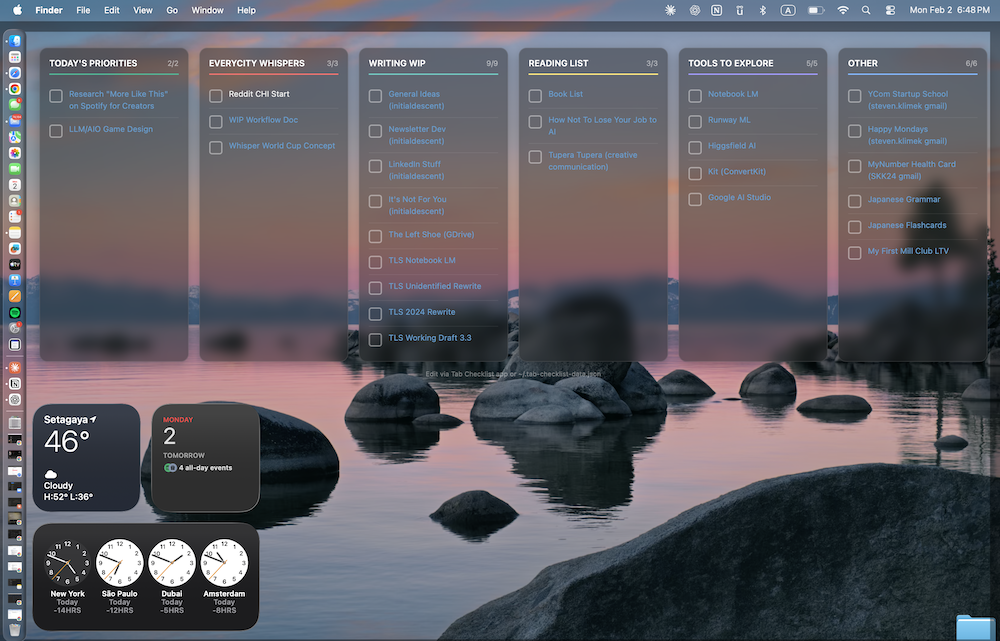
Finally got fed up and built a tiny macOS desktop widget to fix it: a transparent set of columns that act like checklists, floating over my wallpaper—so I can see what I’m supposed to be doing without hunting through a sea of tabs.
The game-changer: clickable links. So I still have quick access to everything… just organized, visible, and not quietly melting my brain (or my hard drive).
Nothing fancy—Übersicht (free desktop widget) + some HTML + a small Node.js server + an hour or two of tinkering with Claude Code. But it’s already changed how I start my day.
If you’re a fellow tab hoarder, I feel you. There’s hope. 🙏
(And if you want the code/setup steps, happy to share.)
(Originally published on LinkedIn, here.)